美图秀秀 - 很好用的图片处理软件


原图跟修图后的对比
美图秀秀是一款很好用的图片处理软件,独有图片特效、美容、场景、闪图等功能,让你1分钟做出影楼级照片!这是我用2分钟做的图片。模特儿是toutou00.blogspot.com的美媚。
官方下载: XiuXiu_Setup.exe
备注:
1) 没有关联的软体不要安装,和千万不要下载 XiuXiu360版本。因为360版本可能会安装恶意软件
2) 为了防止乱码的出现,请先更换您的视窗(Windows)语言去Chinese(PRC)后才安装此软件。如果已经出现了乱码。您可以卸载XiuXiu,再重新安装。
3) 美图秀秀素材下载 (以便离线使用)
Screen Capture for Windows 屏幕抓取

Screen Capture for M/S-Windows System
Need to capture your current working screen shot from Windows 98, XP, 2003, Vista, 2008, 7. It is free and simple. Just press [Ctrl + Print Screen] key on your keyboard. Then start any of your favorite software, for example Microsoft Paint. And then press [Ctrl + v] to paste captured screen shot into it.
p/s: [Print Screen] key normally located right above arrow key.
视窗屏幕抓取
需要抓取你现在所看到的荧幕以便上传?只要你是使用视窗98,XP,2003,Vista,2008 或 7。你就可以免费抓取你的荧幕。你需要使用你的键盘,一起按下[Ctrl]和[Print Screen]键。再打开你喜爱的软件,譬如:Microsoft Paint(画图)。然后一起按下[Ctrl]和[v]以把抓取的荧幕粘贴在里面。就大功告成。
备注: [Print Screen]键通常在方向键上方。
Blogspot / Blogger Templates 部落格界面
Warning: Backup your template & expand widget templates before update with the new one.
忠告:在还没有更新您的Blogger/Blogspot主题之前,请备份您的主题和附加工具(Widget)。
1. Revolution church Blogger Template V1


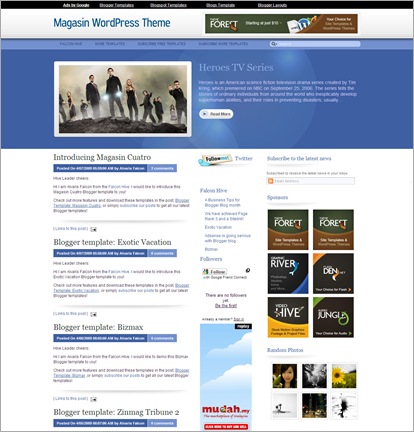


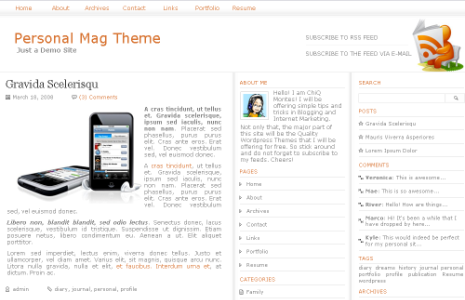


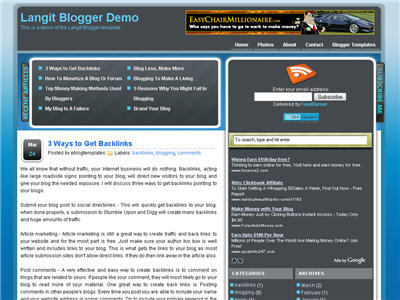

27. Schemermag Blogger Template


30. Maggo Magazine Blogger template

Source: http://bloganol.com/2009/06/30-absolutely-free-magazine-style.html
imeem - Remove upwanted code and resize player 更改播放机尺寸

imeem Player size too big for you, or you just want to stealth your player. Change it!
Click to zoom the picture above for detail
imeem 播放机太大?或者你完全不想看到播放机。把它更改!
点击上图以放大
Add, Embed, Insert Music into Blogspot

Boring Blog without music? Add it!
[Embed music in your main page]
1) Visit http://www.imeem.com and search for your favorite song at the top right.
2) You can also embed a playlist in the same way. Create a imeem account to create your playlists.
3) Copy imeem code. (Click to zoom the picture above for detail)
4) Login Blogger » Dashboard » Layout » Add a Gadget » HTML/JavaScript » Content » Paste imeem code » you can fill in anything for Title » Save.
Note 1: Most song only play 30sec outside of www.imeem.com. Is is because of the copyright.
Note 2: Don't want to register with imeem? Can, refresh / reload your browser until login screen missing.
Related posts : imeem - Remove upwanted code and resize player
没有音乐的部落格很沉闷?嵌入音乐
【在主页里嵌入音乐】
1)造访 http://www.imeem.com 然后于右上角寻找你喜爱的歌曲。
2)你也可以用同样的方法嵌入播放列表。注册你的imeem户口以制作你的播放列表。
3)复制imeem代码。(点击上图以放大)
4)进入Blogger » Dashboard » Layout » Add A Gadget » HTML/JavaScript » Content » 粘贴imeem代码 » Title可以键入任何你喜欢的名称 » Save。
备注1:当你不在www.imeem.com里面时,大部分的歌曲只播放30秒。只是因为版权的问题。
备注2:不想注册imeem?可以,刷新(reload)你的浏览器直到注册画面消失。
有关联的文章 : imeem - 更改播放机尺寸
How to Hide Blogspot Label Count 如何隐藏标签数据

Blogspot Label Count is blocking your way? Disable it!
Blogspot的标签数据阻挡你的视线?把它关闭!
[Disable it / 关闭它]
Blogger dashboard » Layout » Edit html » Expand Widget Templates
Step 4 refer to the image below (Click to zoom)
点击下图以放大,跟随图片里的第四步骤。
Blogspot/Blogger How to link, label, and open in new page 如何链接和标签

Blogspot/Blogger-How to link, label, and open in new page
Click to zoom the image with step by step guideline.
Blogspot/Blogger-如何链接和标签
点击以放大图片。
Embed YouTube Video into your Blogger/Blogspot 嵌入YouTube视频
Embed YouTube Video into your Blogger/Blogspot
Just right-click copy [YouTube Embed Code] and click on in Blogger/Blogspot [New Post] -> [Edit Html] -> & paste it inside the writing area, and continue edit in [Compose] area.
Note: Video will only show in [Preview], not in [Edit Html] and [Compose].
Blogger/Blogspot里嵌入YouTube视频
备注:视频只会在【Preview】里显示,不会在【Edit Html】和【Compose】里显示。
Insert Meta-data tag into blogger / blogspot 如何在Blogger里插入Meta
 Insert Meta-data tag into blogger / blogspot
Insert Meta Tag to Blogger.
Login [www.blogger.com] -> [Layout] -> [Edit Html] -> Refer the red text on the picture.
如何在Blogger里插入Meta Tag
浏览【www.blogger.com】-> 【Layout】->【Edit Html】-> 看图(注意红色的字)
Google Adsense Registration Problem 注册问题
 Google Adsense Registration Problem
Do you have Google Adsense registration problem?
After few weeks of complain with no reply. I've figured out how to fix it.
1) Register a new email account with Google mail.
2) Download and install Google Chrome.
3) Register Google Adsense using Google Chrome with your new Google mail account.
Problem solved.
Google Adsense注册问题
你有没有注册Google Adsense的问题?
经过几个星期的投诉但是没有回应。我已经找到解决的方案。
1)注册新的Google mail户口。
2)下载和安装Google Chrome。
3)启动Google Chrome,然后使用你新的Google mail户口注册Google Adsense。
问题就解决了。


